These school holidays, your kid doesn't just play the game.
They build it.
Four live mornings with AI coach Justin Kabbani. One real game or app, designed by your kid and published on the internet by Thursday, then shown off at Family Demo Night. No coding experience needed. Just ideas.
$497 founding intake · Capped at 20 kids · Pay nothing today
You can fight the screen. Or you can change which side of it your kid is on.
Two weeks of school holidays are coming, and the screens are coming with them. Most kids will spend those weeks consuming: someone else's games, someone else's videos, someone else's ideas. AI Mastery Kids flips it. Same laptop, same holidays, opposite direction. Your kid spends four mornings designing and building something real, coached live. And when the relatives ask what they did in the holidays, your kid sends them a link.
Their idea, built for real
Every kid finishes with a working creation at a real web address. Not a worksheet. Not a save file in an app they'll never open again.
Their game, their rules
An arcade game, a quiz about their team, a choose-your-own-adventure, a study planner. Your kid picks the idea. We coach them through building it.
A real link they can share
Published live on the internet at its own address. Grandparents in another state can be playing it five minutes after Demo Night ends.
Professional tools, kid-safe setup
They build with Claude, the same AI used inside Australia's biggest companies, running on your account with a kid-safe setup you control.
Skills that outlast the holidays
How to brief an AI, how to spot when it makes things up, and how to test everything. Thinking skills first, tech skills second.
Four mornings. One published build.
Live on Zoom, Australia-wide, in the first week of the spring holidays. Sessions run 10:30am to 12:00pm AEST. That's 10:00am in Adelaide and 8:30am in Perth. Every session is recorded, so a missed morning never breaks the week.
Parent orientation
Thirty minutes on Zoom, no kids required. Account setup, every safety setting explained, how the week runs, and your questions answered. The kid-safe setup pack arrives before this call.
How AI actually thinks
Meet Claude properly. Learn to brief an AI like a director, not a wisher. Spot when it makes things up. Then build a first page and watch it appear on screen within minutes.
Design day
Every builder picks their project and plans it like a pro: what it does, who it's for, and what version one looks like. Then they build version one, for real.
Make it brilliant
Features, style and polish, plus the habit that matters most: test everything, trust nothing until you've watched it work. Debugging, taught as detective work.
Publish day
Final touches, then the moment. Their build goes live on the internet at its own address, and we rehearse the demo.
Family Demo Night
Parents, siblings and grandparents pile onto Zoom. Every kid presents what they built and takes questions like a founder. Forty-five minutes of pure pride.
An adult needs to be home during sessions. This is a coached program, not childcare.
The framework big companies train on, sized for a 12 year old
This is not a bag of tips and tricks. Kids learn the 3P Method, the same Prime, Prompt, Produce framework Justin has taught to more than 5,000 professionals at companies like Uber, PepsiCo, Mattel and Macquarie Bank. Kids pick it up fast.
Prime
Teach the AI what you're making and who it's for before you ask for anything. Context first, requests second.
Prompt
Direct the AI like a film director. One clear step at a time beats one giant wish.
Produce
Play it, test it, try to break it. Nothing counts until you've watched it work.
Built by a dad of four. Supervised like it.
Every design decision in this program starts from the same place: would we run it this way for our own kids? Here is exactly how it works.
Your account, your visibility
Kids build on a parent's Claude account. You can open and read every conversation your kid has with the AI, any time you like.
Kid-safe AI setup
Before Day 1 you'll install our setup pack, which tells Claude it is working with a young builder so its responses stay age-appropriate.
Live, recorded, transparent
Every session is recorded and shared with families. Parents are welcome to sit alongside their kid in any session. Cameras are optional.
Small group, real supervision
Capped at 20 kids and run live by Justin. No unsupervised breakout rooms, and participant-to-participant private chat is switched off.
Minimal data
We collect a first name and an age. No kid accounts are created, no photos are posted, and nothing is shared publicly without a parent's say-so.
Parents briefed first
The program starts with a parents-only orientation. Every safety setting explained and every question answered before any kid logs in.
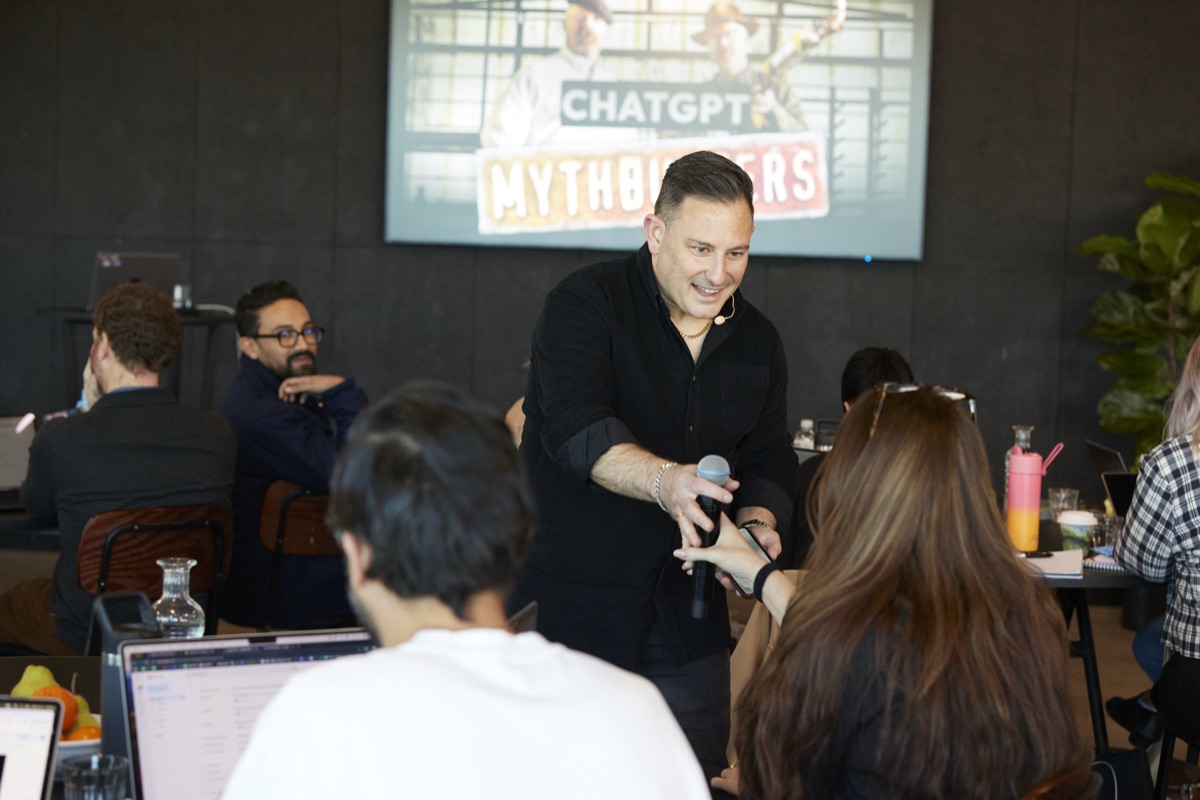
Your kid's coach trains Australia's biggest companies
Justin Kabbani is one of Australia's leading AI educators and keynote speakers. He has trained more than 5,000 professionals across 250+ events for 150+ corporate clients, including Uber, PepsiCo, Mattel and Macquarie Bank.
He is also a dad of four, which means the questions parents have about kids and AI are questions he has had to answer for himself, at his own kitchen table. AI Mastery Kids is the program he built so kids can learn AI the way he teaches adults: hands-on, properly supervised, and aimed at making things.
Trusted by professionals from leading organisations












Made for makers, aged 10 to 16
A great fit for
- •Kids 10 to 16 who love Minecraft, Roblox or making things
- •The kid whose notebook is full of game ideas
- •Teens starting to ask big questions about AI
- •Complete beginners. Zero coding experience expected.
- •A 9 year old can join, paired on one screen with an enrolled older sibling
Not the right fit for
- ×Kids under 9. The tools ask too much of them yet.
- ×Kids after passive videos. Every session is live and hands-on.
- ×Families needing childcare. A parent or adult must be home during sessions.
- ×Teens already writing serious code. They'll want more depth than a holiday program.
What they walk away with
Their own published app
A real link, made by them, that stays live after the program ends. Try getting them to stop improving it.
AI literacy school hasn't caught up to
When to trust AI, when to check it, and how to get real work out of it. The skill their whole schooling era will be shaped by.
The 'I made this' shift
Demo Night does something to a kid. Presenting a thing you built to a room full of adults changes how you see yourself.
A certificate worth keeping
An AI Mastery Kids certificate with their name and their app's address on it, posted home after Demo Night.
Twenty spots. First intake ever.
AI Mastery Kids has never run before. The founding intake is small on purpose: twenty kids, coached live, with help arriving the moment anyone gets stuck. Founding families get the best price this program will ever have.
- Four live 90-minute build sessions
- Parents-only orientation on the Sunday night
- Family Demo Night finale
- Recordings of every session
- Kid-safe setup pack for your Claude account
- Printed certificate, posted home
- Two weeks of builder support after the program
You supply: a laptop or desktop, Zoom, and a Claude paid plan for the month (about $30, cancel anytime). The setup pack covers it all in about 20 minutes.
The Day 1 promise
Sit in on the first session with your kid. If it's not right for them, tell us that day and we'll refund every cent.
Registering saves a place in the queue, and costs nothing. We confirm spots by email in order, with the enrolment link and payment details. When 20 spots are gone, they're gone.
Asked and answered
My kid has never coded. Is that a problem?
No, it's the point. AI Mastery Kids is built for beginners. Kids describe what they want in plain English and learn to direct the AI that writes the code. What we teach is the describing, directing, checking and improving. That's the durable skill.
Exactly what ages is this for?
Ages 10 to 16. The range works because every kid builds their own project at their own level, with live coaching when they're stuck. A 9 year old can take part by pairing with an enrolled older sibling on one screen. Under 9 is too young for the tools, and we'd rather tell you that now.
What equipment do we need?
A laptop or desktop (Mac or Windows) with Chrome, Zoom and a solid internet connection. An iPad or tablet won't cut it for building. A second screen is nice but not needed.
Why does it need a paid Claude account?
The kids build with Claude Code, the professional building tool, which sits on Claude's paid plan (about $30 for the month, cancel anytime). It runs on your account, not your kid's, which is exactly what keeps you in control: every conversation is visible to you.
We're not on the east coast. Does it still work?
Yes. It's fully online. Sessions run 10:30am to 12:00pm AEST, which is 10:00am in Adelaide and 8:30am in Perth. Every session is recorded, so a tricky timezone or a missed morning never breaks the week.
What if we miss a session?
The recording lands the same day with catch-up notes, and the next morning starts with a recap. Kids who miss a morning still publish on Thursday.
How do I know it's safe?
Kids work on your Claude account with a kid-safe setup, sessions are live, recorded and supervised, private chat between participants is off, and we collect nothing beyond a first name and age. The parent orientation walks through every setting before your kid ever logs in, and you're welcome to sit in on any session.
Isn't building with AI just cheating?
Only if using a calculator is cheating at maths. The skill of the next decade is directing AI well: clear briefs, sharp questions, and checking everything it produces. Kids will meet AI either way. This program teaches them to be the one in charge of it.
Will there be another intake?
The plan is to run future intakes in later school holidays, at the standard $697 rate. The founding intake price won't return, and founding families get first option on future programs.
What's the refund policy?
Full refund any time before the parent orientation, no questions asked. Then the Day 1 promise: sit in on the first session with your kid, and if it's not right for them, tell us that day and we'll refund every cent.
The holidays are coming either way
Send them back to school with something they built.
Save Their Spot